



Skip to content

Boost under acceleration

Featured Replies

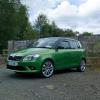
I would like to find out from anyone who has info how the boost amount varies under acceleration. Reason being is I think I am not getting full turbo boost when in Turbo only mode, possibly less actual boost than Supercharger. I have had the car serviced this week and there were no fault codes found so I am taking it upon myself to bit of extra legwork and research. I'm pretty sure that the car doesn't feel quite as quick at the top end as it used to, I don't think its me getting used to the power but I want to be sure. Having no fault codes (i checked before the service too and nothing found) I am not sure where to start on this. Have never had any engine lights on ever, and had one occasion of zero power above 3k rpm but been fairly ok since. 


I have an OBD2 bluetooth adapter and the Torque app for my phone which I have used. I will try and get some boost graphs to post later today, but for now all I have is a figure of around 1.5 bar during S/C and dropping to around 1 bar once in turbo only mode. 


Can anyone who has used Torque or similar shed some light on what I should be seeing when monitoring the "Turbo Boost &Vacuum gauge" sensor on a Fab VRS. If possible I am looking for figures of a standard, non-mapped CAVE engine for reference please. 


Thanks in advance!


  • Author

Righty, I went out on a drive to see if I could get a clearer picture of what was going on with the boost. Unfortunately the graphing isn't really that suited to this kinda stuff, or I haven't mastered it yet. I have a couple of shots of boost vs time that shows how the boost rises to a peak and then falls and one which shows boost vs RPM as a scatter graph. The third one helps slightly to see how it varies with RPM but now I am wondering if it is just the wastegate kicking in to level the boost at a set level.


Any thoughts?

post-93536-0-32029500-1410020955_thumb.jpg

post-93536-0-25089200-1410020962_thumb.jpg

post-93536-0-77828300-1410021109_thumb.jpg

Create an account or sign in to comment

Recently Browsing 0

  • No registered users viewing this page.

Important Information

Welcome to BRISKODA. Please note the following important links Terms of Use. We have a comprehensive Privacy Policy. We have placed cookies on your device to help make this website better. You can adjust your cookie settings, otherwise we'll assume you're okay to continue.

Account

Navigation

Configure browser push notifications

Chrome (Android)
  1. Tap the lock icon next to the address bar.
  2. Tap Permissions → Notifications.
  3. Adjust your preference.
Chrome (Desktop)
  1. Click the padlock icon in the address bar.
  2. Select Site settings.
  3. Find Notifications and adjust your preference.
