
Simon TDI Sport
FREEDOM
-
Joined
-
Last visited
-
It was only a couple of months ago. Dealer was Johnson's of Wigan.
-
I recently replaced mine at a cost of £83.16 from local Skoda dealer.
-
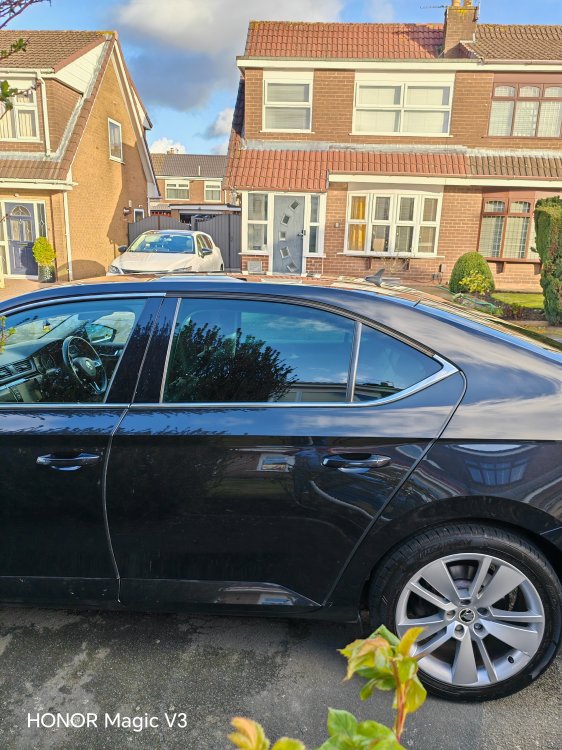
Ordered a replacement chrome external trim for my superb mk3 sel executive on the passenger rear door from Skoda. Nearly choked at the price £83.16.
-
I have 2 x 225/45/18 Khumo PS 72 brand new never fitted want £120. These are Collection only or arrange your own courier. Collection from Wigan. these have now been SOLD.
-
-
-
Have you taken the right side window switch and connected to left side? Does it work? At least then you know if switch is faulty or not.
-
Sounds like you need to tell the car you have Bluetooth fitted. Are you using vcds to program the car.
-
My car is 2011. Coding was needed to allow sat nav and phone integration.
-
I've done the same thing bought an RNS315 with dab and fitted the Mic and dab antenna. That's probably your easiest route.
-
I believe you need to have a couple of wires added to the body control module. Have a search in here for it. A member Dilligaf I think has done it and got it working.
-
They will both be H7 bulbs.
-
-
2011 black glass.
-
I have a MK2 vrs bought it in June. Have an issue with main beam flash not working without headlamp on. Works okay with lights on, doesn't work when lights off. Been told by an auto electrician that it's possible wrong headlamps fitted. I have the single bulb H7 headlamps. Is this right or should they be the twin bulb H4? Thanks for any help.